How to Use OpenClaw with Azure Foundry OpenAI Using LiteLLM Proxy
Connect OpenClaw AI coding agent to Azure OpenAI using LiteLLM proxy. Use your $5k Azure Sponsorship or MSDN credits with the 124k-star open-source AI assistant. Step-by-step guide with working config.
title: How to Use OpenClaw with Azure Foundry OpenAI Using LiteLLM Proxy published: true description: Connect OpenClaw AI coding agent to Azure OpenAI using LiteLLM proxy. Use your $5k Azure Sponsorship or MSDN credits with the 124k-star open-source AI assistant. Step-by-step guide with working config. tags: azure, llm, ai, opensource series: Azure AI Integration Guides#
TL;DR:
OpenClaw doesn't natively support Azure OpenAI. This guide shows you how to use LiteLLM as a proxy to route OpenClaw requests to Azure OpenAI, letting you use your Azure credits ($150 free tier, startup credits, enterprise subscriptions).
The Problem#
OpenClaw is an incredible open-source AI coding agent with 124k+ GitHub stars. But when you try to configure it with Azure OpenAI, you'll find... it's not supported.
┌─────────────────────────────────────────────────────────┐
│  OpenClaw Model Selection                               │
├─────────────────────────────────────────────────────────┤
│  ✓ OpenAI (gpt-4o, gpt-4o-mini)                        │
│  ✓ Anthropic (claude-3.5-sonnet, claude-3-opus)        │
│  ✓ Google (gemini-2.0-flash, gemini-1.5-pro)           │
│  ✓ DeepSeek, Groq, Mistral, xAI...                     │
│  ✗ Azure OpenAI  ← Not available!                      │
│  ✗ Azure AI Foundry                                     │
└─────────────────────────────────────────────────────────┘
This is a problem if you have:
- Azure Sponsorship credits ($5,000 for startups/MVPs)
- MSDN/Visual Studio subscription ($150/month Azure credits)
- Enterprise policies requiring Azure-hosted models
- Regional compliance needs (Azure has 60+ regions)
I've raised a feature request (#6056) for native Azure support, but until then, here's the workaround.
The Solution: LiteLLM Proxy#
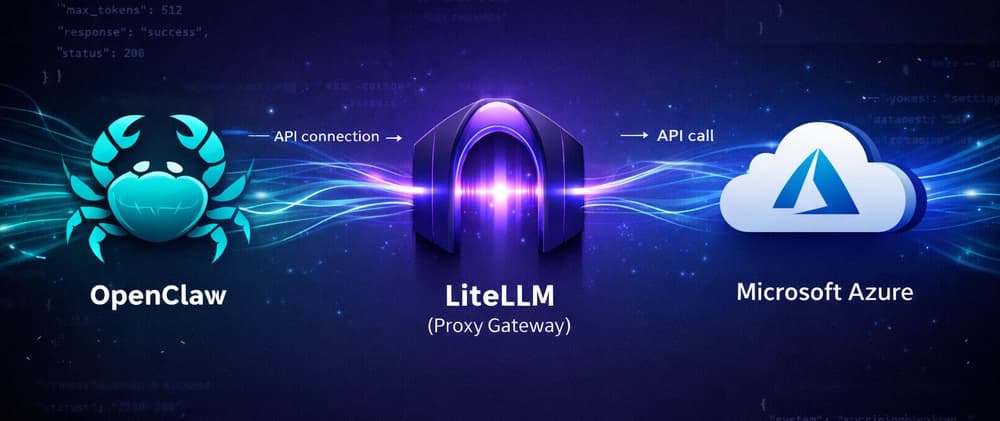
LiteLLM is an OpenAI-compatible proxy that translates API calls to 100+ LLM providers, including Azure OpenAI.
┌──────────────┐      ┌──────────────┐      ┌──────────────────┐
│   OpenClaw   │ ──── │   LiteLLM    │ ──── │  Azure OpenAI    │
│   Agent      │      │   Proxy      │      │  (your credits)  │
└──────────────┘      └──────────────┘      └──────────────────┘
     :18789              :4000           eastus.api.cognitive...
        │                   │                      │
        └── OpenAI API ─────┘                      │
                            └── Azure API ─────────┘
OpenClaw thinks it's talking to OpenAI. LiteLLM translates to Azure format. You use Azure credits.
Prerequisites#
| Requirement | Details |
|---|---|
| Azure OpenAI resource | With GPT-4o or GPT-4o-mini deployed |
| Server/VM | Ubuntu 22.04 recommended |
| Node.js | 22+ for OpenClaw |
| Python | 3.9+ for LiteLLM |
Get Your Azure OpenAI Details#
From Azure Portal → Azure OpenAI → your resource:
| Setting | Example |
|---|---|
| Endpoint | https://eastus.api.cognitive.microsoft.com |
| API Key | EuRBGeGG... (Keys and Endpoint section) |
| Deployment name | gpt4o-mini (Model deployments section) |
| API Version | 2024-10-21 |
Step 1: Install LiteLLM#
# Create virtual environment
python3 -m venv ~/litellm-venv
source ~/litellm-venv/bin/activate

# Install LiteLLM
pip install 'litellm[proxy]'
Step 2: Configure LiteLLM#
Create ~/litellm_config.yaml:
model_list:
  - model_name: gpt-4o-mini
    litellm_params:
      model: azure/gpt4o-mini          # "azure/" prefix + deployment name
      api_base: https://eastus.api.cognitive.microsoft.com
      api_key: YOUR_AZURE_OPENAI_KEY   # Replace with your key
      api_version: "2024-10-21"

  - model_name: gpt-4o
    litellm_params:
      model: azure/gpt4o
      api_base: https://eastus.api.cognitive.microsoft.com
      api_key: YOUR_AZURE_OPENAI_KEY
      api_version: "2024-10-21"

general_settings:
  master_key: "sk-litellm-your-secret-key"  # Any string you choose

litellm_settings:
  drop_params: true  # CRITICAL: OpenClaw sends params Azure doesn't support
Important: The
drop_params: truesetting is critical. OpenClaw sends parameters likestorethat Azure OpenAI rejects. This setting tells LiteLLM to silently drop unsupported parameters.
Step 3: Test LiteLLM#
# Start LiteLLM
litellm --config ~/litellm_config.yaml --port 4000

# In another terminal, test it
curl http://localhost:4000/v1/chat/completions \
  -H "Authorization: Bearer sk-litellm-your-secret-key" \
  -H "Content-Type: application/json" \
  -d '{
    "model": "gpt-4o-mini",
    "messages": [{"role": "user", "content": "Say hello!"}]
  }'
You should get a response from Azure OpenAI.
Step 4: Install OpenClaw#
# Install pnpm if needed
curl -fsSL https://get.pnpm.io/install.sh | sh -

# Install OpenClaw
pnpm add -g @anthropic/openclaw

# Verify installation
openclaw --version
Step 5: Configure OpenClaw#
This is where it gets tricky. OpenClaw's custom provider config requires specific fields that aren't well-documented.
Edit ~/.openclaw/openclaw.json:
{
  "gateway": {
    "mode": "local",
    "port": 18789,
    "auth": {
      "token": "your-gateway-token"
    }
  },
  "agents": {
    "defaults": {
      "model": {
        "primary": "litellm/gpt-4o-mini"
      },
      "models": {
        "litellm/gpt-4o-mini": {
          "alias": "GPT-4o Mini (Azure)"
        }
      }
    }
  },
  "models": {
    "mode": "merge",
    "providers": {
      "litellm": {
        "baseUrl": "http://localhost:4000/v1",
        "apiKey": "sk-litellm-your-secret-key",
        "api": "openai-completions",
        "models": [
          {
            "id": "gpt-4o-mini",
            "name": "GPT-4o Mini (Azure)",
            "reasoning": false,
            "input": ["text", "image"],
            "contextWindow": 128000,
            "maxTokens": 16384
          },
          {
            "id": "gpt-4o",
            "name": "GPT-4o (Azure)",
            "reasoning": false,
            "input": ["text", "image"],
            "contextWindow": 128000,
            "maxTokens": 16384
          }
        ]
      }
    }
  }
}
Critical Configuration Points#
| Field | Value | Why It Matters |
|---|---|---|
models.mode |
"merge" |
Merges custom providers with built-in ones |
providers.litellm.api |
"openai-completions" |
Tells OpenClaw which API format to use |
agents.defaults.models |
Model alias object | Required for model selection UI |
model.primary |
"litellm/gpt-4o-mini" |
Provider prefix + model ID |
Missing the
apifield causes a cryptic error:No API provider registered for api: undefined. I've raised issue #6054 to improve this error message.
Step 6: Set Environment Variables#
Create ~/.openclaw/.env:
OPENAI_API_KEY=sk-litellm-your-secret-key
OPENAI_BASE_URL=http://localhost:4000/v1
OPENCLAW_GATEWAY_TOKEN=your-gateway-token
Step 7: Run as Systemd Services (Production)#
LiteLLM Service#
Create /etc/systemd/system/litellm.service:
[Unit]
Description=LiteLLM Proxy for Azure OpenAI
After=network.target

[Service]
Type=simple
User=your-username
WorkingDirectory=/home/your-username
ExecStart=/home/your-username/litellm-venv/bin/litellm \
    --config /home/your-username/litellm_config.yaml \
    --port 4000
Restart=always
RestartSec=10

[Install]
WantedBy=multi-user.target
OpenClaw Service#
Create /etc/systemd/system/openclaw.service:
[Unit]
Description=OpenClaw Gateway
After=network.target litellm.service
Requires=litellm.service

[Service]
Type=simple
User=your-username
WorkingDirectory=/home/your-username/openclaw-workdir
EnvironmentFile=/home/your-username/.openclaw/.env
ExecStart=/home/your-username/.local/share/pnpm/openclaw gateway \
    --port 18789
Restart=always
RestartSec=10

[Install]
WantedBy=multi-user.target
Enable and start:
sudo systemctl daemon-reload
sudo systemctl enable litellm openclaw
sudo systemctl start litellm openclaw
Step 8: Verify It Works#
# Check services
sudo systemctl status litellm openclaw

# Check LiteLLM logs (should show 200 OK responses)
sudo journalctl -u litellm -f

# Open OpenClaw chat
openclaw chat
You should see responses from GPT-4o-mini, powered by your Azure credits!
Troubleshooting#
Error: "azure does not support parameters: ['store']"#
Fix: Add drop_params: true to litellm_settings in your config.
litellm_settings:
  drop_params: true
Error: "No API provider registered for api: undefined"#
Fix: Add "api": "openai-completions" to your custom provider in openclaw.json.
Error: "401 Incorrect API key" pointing to api.openai.com#
Fix: OpenClaw is ignoring your LiteLLM proxy. Ensure:
- Custom provider has
baseUrlset correctly OPENAI_BASE_URLis set in environment- Model reference uses provider prefix:
litellm/gpt-4o-mini
Empty responses (agent completes but no output)#
Fix: Usually the drop_params: true issue. Check LiteLLM logs:
sudo journalctl -u litellm -n 50Cost Comparison#
| Model | OpenAI Direct | Azure OpenAI |
|---|---|---|
| GPT-4o-mini input | $0.15/1M | $0.15/1M |
| GPT-4o-mini output | $0.60/1M | $0.60/1M |
| GPT-4o input | $2.50/1M | $2.50/1M |
| GPT-4o output | $10.00/1M | $10.00/1M |
Same pricing, but Azure lets you use:
- Sponsorship credits ($5,000 for startups)
- MSDN credits ($150/month)
- Enterprise agreements
- Reserved capacity discounts
Conclusion#
Until OpenClaw adds native Azure OpenAI support (vote on #6056), LiteLLM is the bridge you need. The setup takes about 15 minutes, and then you get the full OpenClaw experience powered by your Azure credits.
Architecture recap:
┌─────────────────────────────────────────────────────────────┐
│                      Your Infrastructure                     │
├─────────────────────────────────────────────────────────────┤
│                                                              │
│  ┌──────────┐    ┌──────────┐    ┌─────────────────────┐   │
│  │ OpenClaw │───▶│ LiteLLM  │───▶│    Azure OpenAI     │   │
│  │  :18789  │    │  :4000   │    │ eastus.cognitive... │   │
│  └──────────┘    └──────────┘    └─────────────────────┘   │
│       │                                     │               │
│       │         OpenAI-compatible           │               │
│       └────────────  API  ──────────────────┘               │
│                                                              │
│  Uses: $5k Azure Sponsorship / MSDN Credits / Enterprise   │
└─────────────────────────────────────────────────────────────┘Resources#
- OpenClaw GitHub - 124k+ stars
- LiteLLM Documentation
- Azure OpenAI Pricing
- Issue #6056: Native Azure Support Request
- Issue #6054: Better Error Messages
Let's Discuss 💬#
I'd love to hear from you:
- Are you using Azure credits for AI development? What's your setup?
- Have you tried other LLM proxies? How does LiteLLM compare?
- What AI tools need Azure integration? Drop a comment!
Help the community:
- ⭐ Star OpenClaw on GitHub
- 👍 Upvote Issue #6056 for native Azure support
- 🔄 Share this guide with developers who have Azure credits
Keywords#
Azure OpenAI · LiteLLM Proxy · OpenClaw Configuration · AI Coding Agent · GPT-4o Azure · Azure Credits · LLM Gateway · Open Source AI · MSDN Credits AI · Azure Sponsorship
Published by GDSKS • Lead Architect, Founder at GLINCKER • Building GLINR Platform
Found this helpful? Give it a ❤️ and follow for more Azure + AI tutorials!